

Salesforce development,
all in one app
Blaze is an AI agent for Salesforce admins and developers. Describe what you want in plain language, and it moves the work forward from organizing requirements to configuration, implementation, testing and deployment.
Requirements, design, implementation, testing and release: everything Salesforce development needs, in a single app.
- Interview to
clarify needs - Write requirements
with diagrams
- Investigate the
current org - Compare options,
set the data model
- Configure and
develop Salesforce - Apply to the org
after approval
- Write and run
test classes - Check screens
in a browser
- Review diffs and
deploy to production - Track changes
and roll back
when a deal is won
 Dev sandboxTarget Salesforce orgBlazer 1

 OpenAI






 70+ more
Ask with text, images, Word, PowerPoint or PDF










Build topics
and actions,
then test them

Approvals too


No SOQL needed

Sharing rules too
Test classes generated too
Checks UI behavior


Dashboards too

Share by URL

Apps and tabs
Prod & sandbox
Blazer 1OpenAI
Requirements to release, all in Blaze
Organize requirements, design, build, test and deploy in one continuous conversation. Context carries over from stage to stage.
Connect directly to your org, then apply and test
Blaze reads the latest metadata from the connected org before changing it, then applies the changes. If a deployment fails, it finds the cause and fixes it.
Approvals and change tracking you can trust
Blaze asks for confirmation before anything that changes your org, records every change and can roll it back. Deployments to production ask for approval with the target org name shown.
needs and redo work
and impact by hand
screens and code
after every fix
production by hand
a requirements document
shows the impact
and it's applied
screen behavior
deploy and roll back
Roll back Salesforce changes
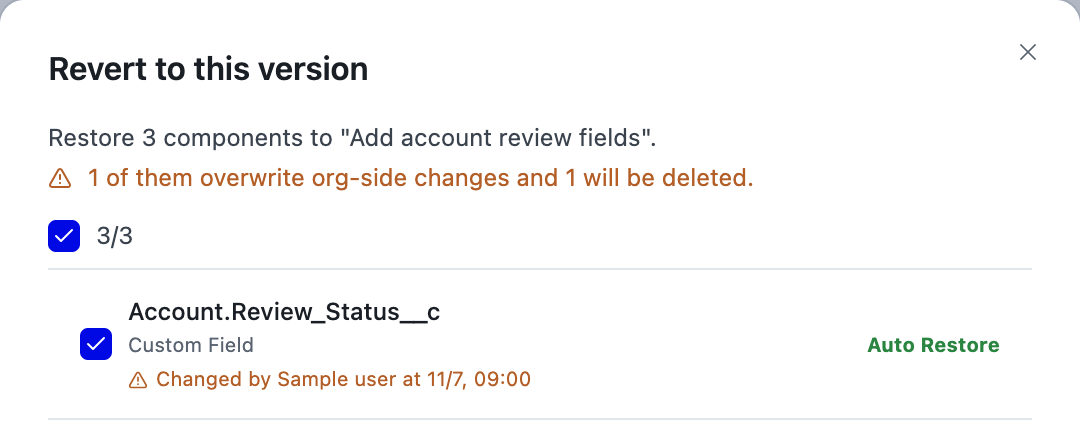
Changes to Salesforce are recorded, so you can return to an earlier state whenever needed and experiment safely
Deploy and test in one place
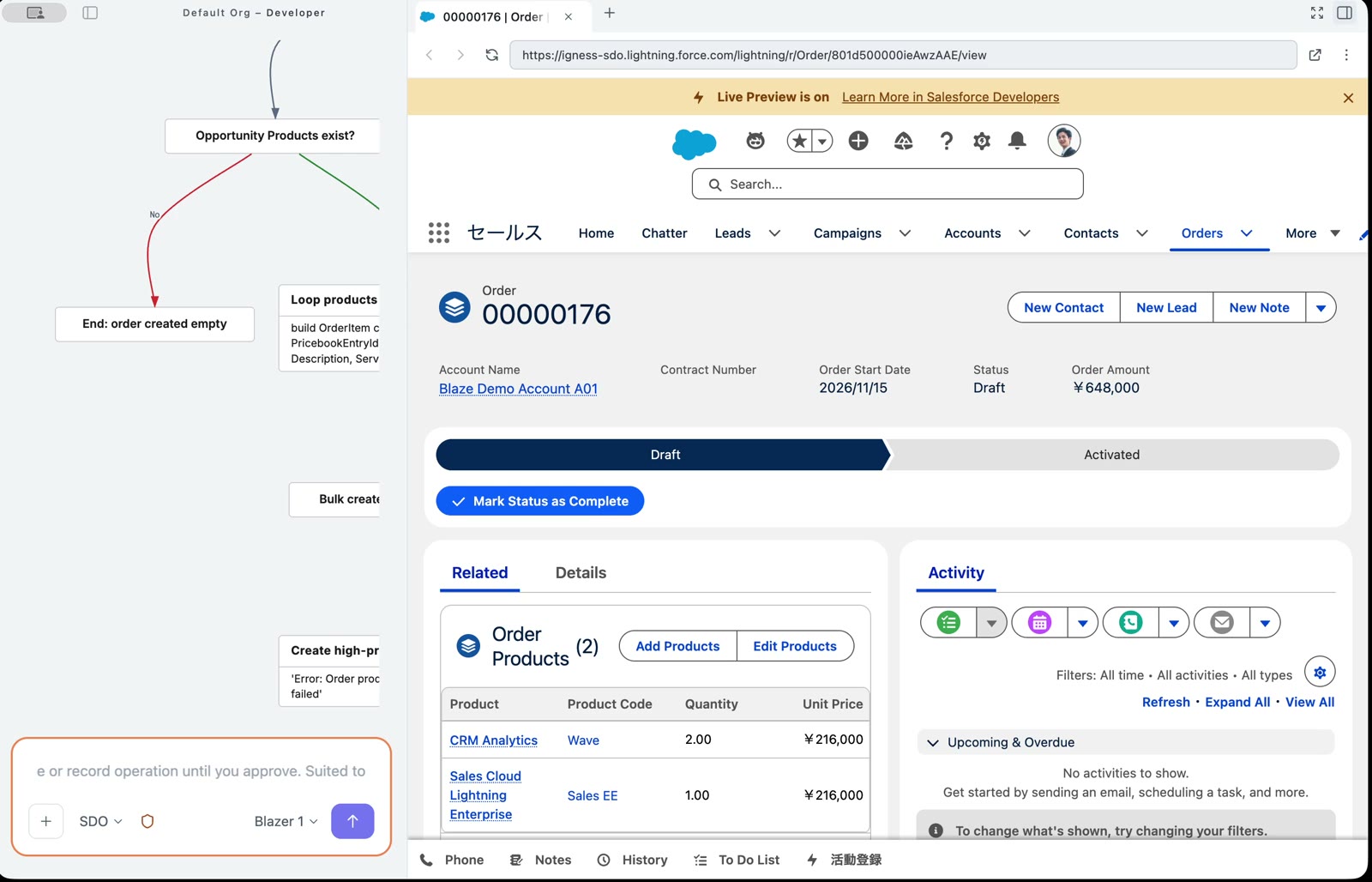
From deploying to the org to running tests, the work continues in a single app
Diagram requirements and designs
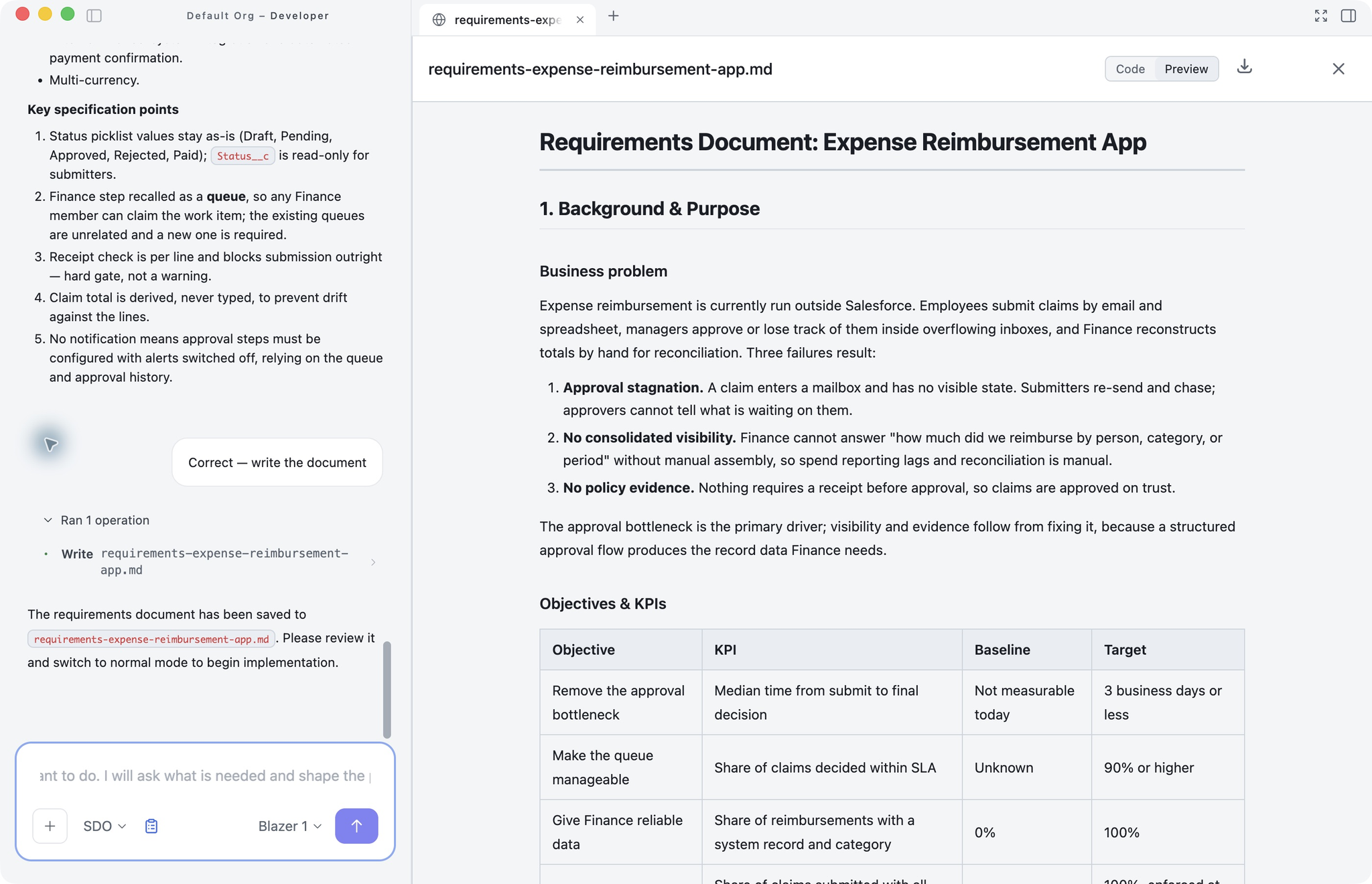
Answer the questions and you get a requirements document with diagrams, making it easy to align with stakeholders
Blaze interviews you and
writes the requirements
Just answer to turn needs into Salesforce requirements
Blaze asks about the business context, stakeholders, must-have and optional requirements, and constraints, one at a time.
Business flows and ER diagrams, drawn for you
Business flows, ER diagrams and state transitions are produced as real diagrams.
Ready to use as a deliverable
Export to PDF, Word or Markdown. Your org is not touched during this stage.
then proposes a data model
Automatically checks your current org
Reads existing objects, fields and automation to find what can be reused first.
Choose from multiple approaches
Compare options such as using standard objects or building custom ones, and agree on a direction.
Data model, screens and validation rules
ER diagrams, page layouts, validation rules and state transitions are decided before anything is built.
Sign up to see the rest of this deck.
Sign up to keep reading
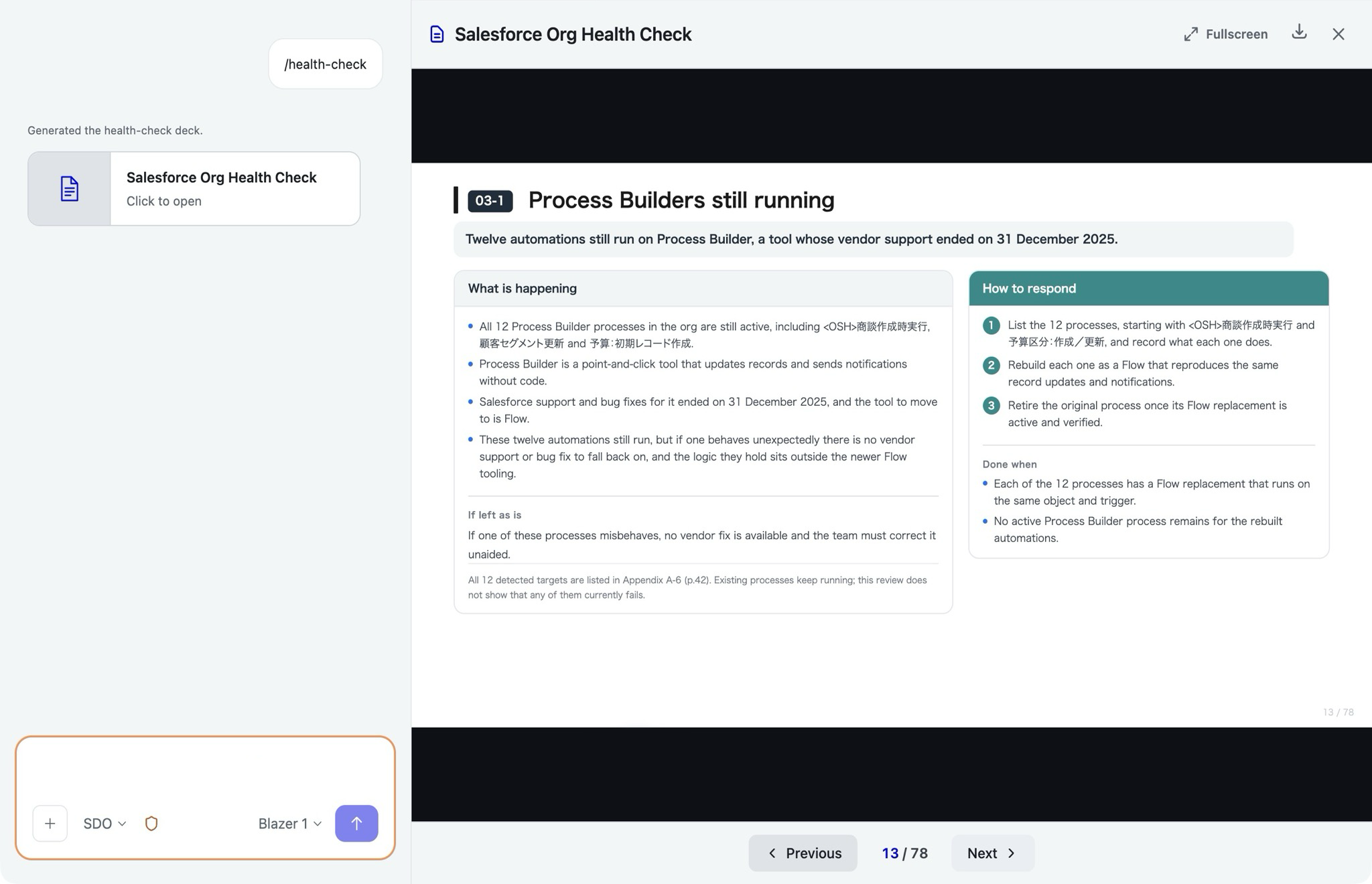
and optimize costs
Identify unused objects and fields
Identify unneeded licenses and features
Summarize findings in a report
/health-check summarizes unused fields, flows and licenses, plus Lightning migration readiness, in a report.
Sign up to see the rest of this deck.
Sign up to keep reading
Sales Cloud &Service Cloud
Objects, fields,
permissions,
records
Flows &approval processes
Build, fix,
debug errors
 Apex & LWC
Classes &
test classes
AgentforceTopics &
actions
OmniScript &
FlexCard
Reports &dashboards
Custom
report types
Data migrationBulk create and
update via CSV
SlackRead and post
to channels
Sign up to see the rest of this deck.
Sign up to keep reading
work safely in production
Choose Allow, Always allow or Deny
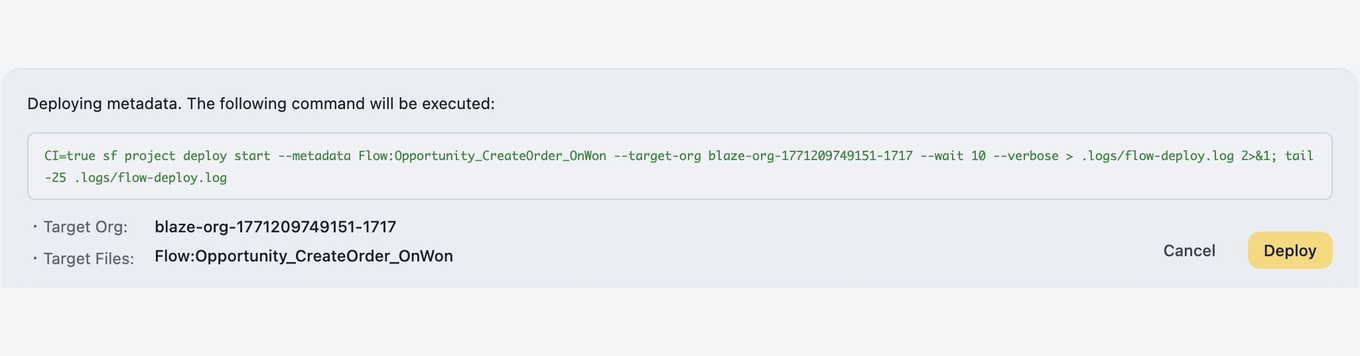
Blaze stops right before metadata changes, data updates and deployments so you can decide on the spot.
Production approvals show the org name
Deployments to production and data deletion ask for approval with the target org name on screen.
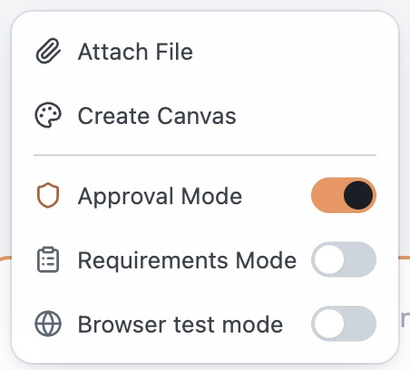
Switch it from the input box
Turn Approval Mode on or off with a toggle in the input box menu.
Sign up to see the rest of this deck.
Sign up to keep reading
just ask in plain language
Proposes changes that fit your org
Checks existing objects and fields before proposing changes.
Page layouts and apps too
Page layouts, Lightning apps, tabs and navigation are set up through chat.
Profiles, permission sets and sharing rules
Even complex access settings are handled entirely in chat.
Sign up to see the rest of this deck.
Sign up to keep reading
all through chat
Build flows and approval processes
Describe the conditions and steps, and Blaze builds the flow or approval process.
Fix errors in existing flows
Blaze finds the cause of an error, fixes it and confirms it works.
Follows flow best practices
Changes follow Salesforce conventions, such as deactivating flows instead of deleting them.
Sign up to see the rest of this deck.
Sign up to keep reading
test classes included
Write classes and triggers
Writes Apex classes and triggers from your requirements.
Lightning components too
Builds LWCs and lets you check the result right away in a live preview.
Test classes, automatically
Also writes Apex test classes and runs them in your org.
Sign up to see the rest of this deck.
Sign up to keep reading
and test them inside Blaze
Create topics, actions and instructions
Create and edit agent settings through chat.
Test behavior on the spot
Talk to the agent from inside Blaze to check its responses and actions.
Connect to Salesforce data
Prepare flow and Apex actions in the same conversation.
Sign up to see the rest of this deck.
Sign up to keep reading
and share it as a dashboard
Ask your question in chat
Blaze retrieves Salesforce data and analyzes it as instructed.
Review results in charts and tables
Results are compiled into a dashboard you can review and edit on the canvas.
Share results with stakeholders
Share the dashboard through a password-protected URL.
Sign up to see the rest of this deck.
Sign up to keep reading
on real screens
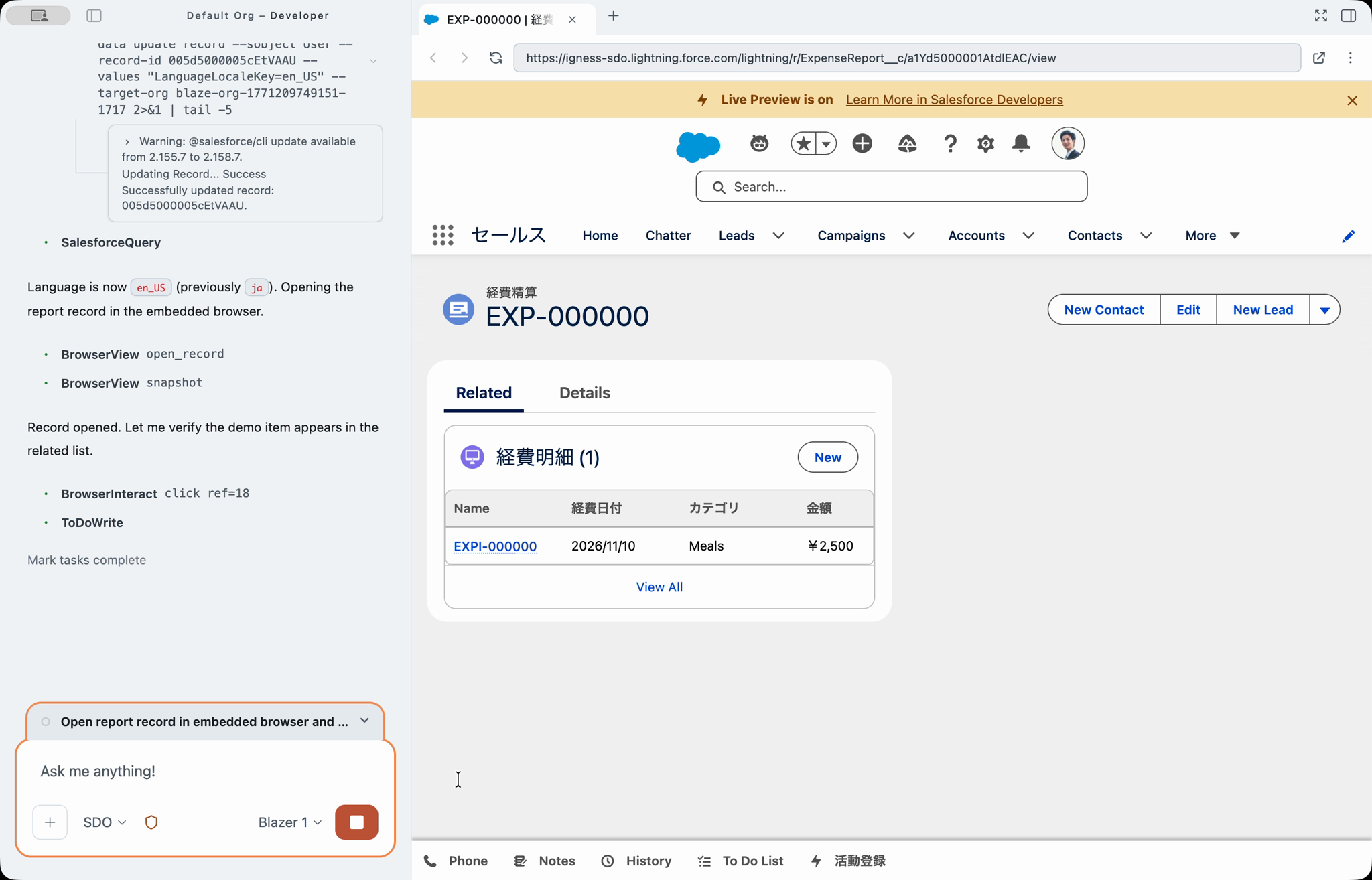
Operates a browser inside the app
Blaze reads the screen, clicks and types, and checks that everything works as intended.
Save tests and run them again
Steps are saved as tests you can rerun, edit and share across your organization.
Regression and acceptance testing
After a change, confirm that existing operations still work.
Sign up to see the rest of this deck.
Sign up to keep reading
and roll back to any point
Deploy with a full diff
Review the differences between sandbox and production as you deploy, with automatic post-deployment checks.
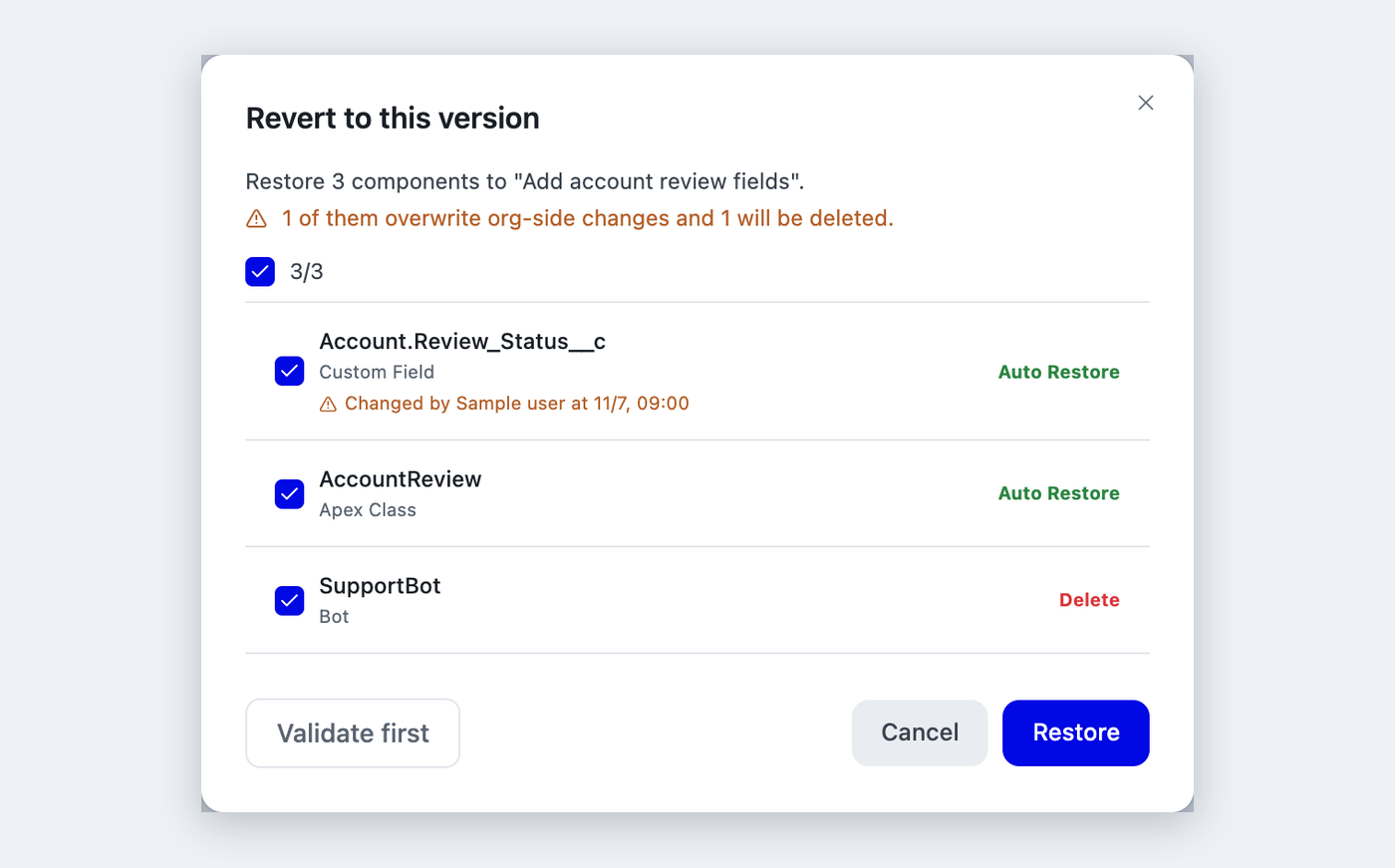
Roll back in one click
Blaze records its changes and checks that a rollback can be applied before reverting. No Git installation needed.
Push and pull with GitHub
If your team uses Git, push and pull to GitHub from change management.
Sign up to see the rest of this deck.
Sign up to keep reading
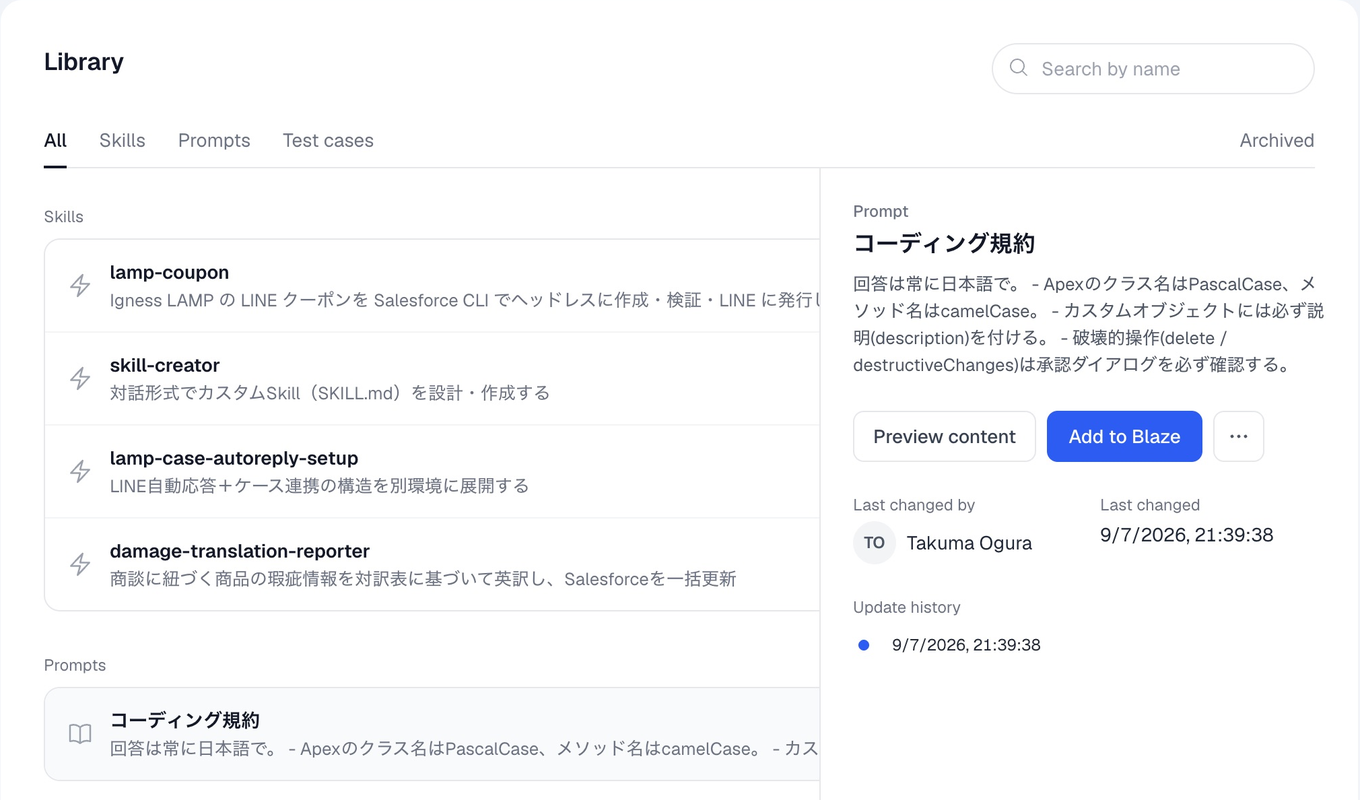
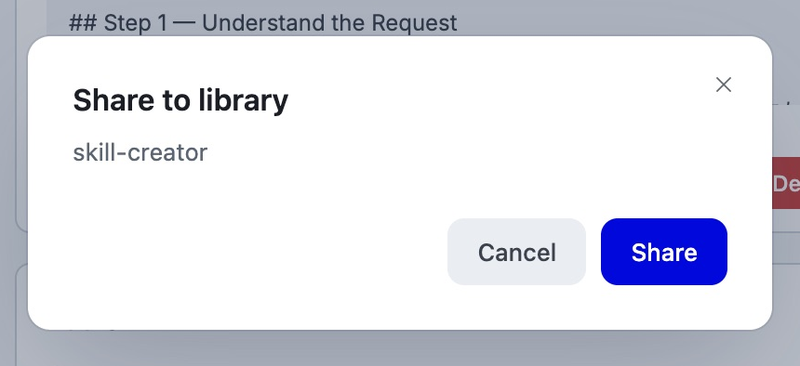
Share in one click
Click “Share to library” in Blaze settings to add it to your organization's library.
Add to your own Blaze in one click
Members just click “Add to Blaze” in the library. Skills are ready to use as slash commands right away.
Version history with rollback
Records who changed what and when. Compare versions and restore an earlier one.
Sign up to see the rest of this deck.
Sign up to keep reading
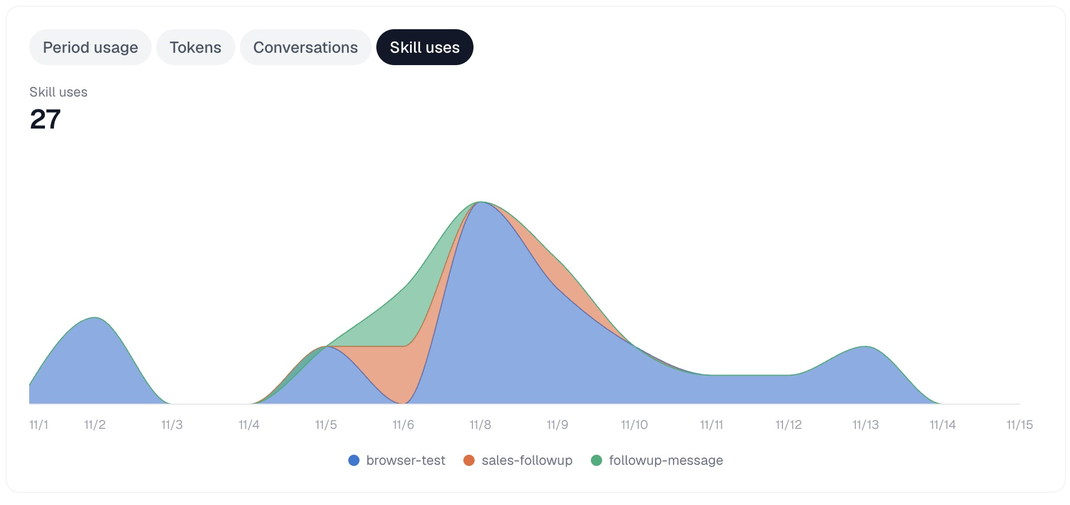
Usage
Credits by model provider, tokens and conversations
Skill usage
Uses per Skill and the number of members using it
By Salesforce org
Users, conversations and credits per org
By member
Conversations, models and tokens per member
Sign up to see the rest of this deck.
Sign up to keep reading
High-performance agent mode built for Salesforce
- Tuned for Salesforce work
- Responds quickly to keep work moving
- Keeps costs down
OpenAISign up to see the rest of this deck.
Sign up to keep reading
Development
















Docs & files








Communication







Accounting








Projects




Design





Monitoring






Sales & support





Automation

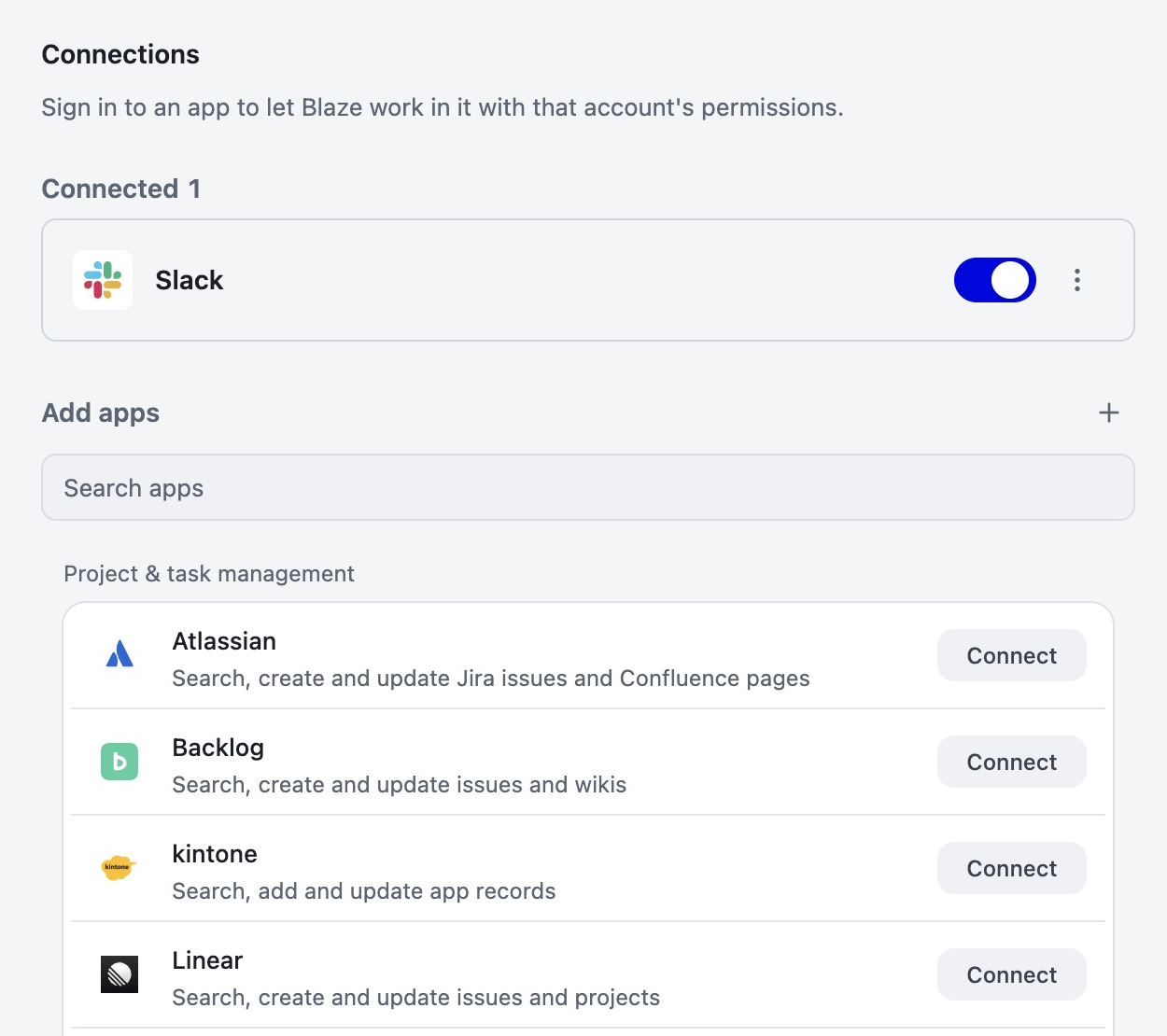
by adding an MCP server
Sign up to see the rest of this deck.
Sign up to keep reading
Skills and custom prompts
Turn routine work into Skills, and inject instructions such as development standards automatically every time.
Subagents
Split complex work across multiple subagents running in parallel.
Search panel
Search conversations, settings, tests, canvases and files in one place.
Image generation
Generate images for HTML emails in Account Engagement and MC Next.
Multiple org connections
Switch between production, sandboxes, scratch orgs and Developer Edition.
Launcher
Open a small input box with a shortcut and ask from any screen.
Blaze CLI
Use Blaze from the terminal. Hooks fit it into your own workflow and CI.
Sign up to see the rest of this deck.
Sign up to keep reading












 LegalOn Technologies, Inc.With no prompt setup, first answers met80–90% of expectations
 Rhizome Co., Ltd.Complex flow and screens during a layover,released in 1.5 hours
 Surpass Co., Ltd.Requests that used to take 1–2 weekshandled in 2–3 hours
Sign up to see the rest of this deck.
Sign up to keep reading
and shifts time from maintenance to proactive development

| Company | LegalOn Technologies, Inc. |
| Industry | Legal tech |
- As the organization grew, development came to depend on individuals, and standardizing processes and quality became a challenge
- Weekly releases stretched development resources, and hiring the right people was hard
- Deep understanding of Salesforce. With no prompt setup, first answers met 80–90% of expectations
- Streamlines not only requirements but releases too
- Small fixes to existing flows and picklist changes go from requirements to deployment with Blaze
- Used for task breakdown, brainstorming and implementation even on 2–3 week projects
- Instead of losing time to small tasks, the team can focus on improving the environment and larger projects
Sign up to see the rest of this deck.
Sign up to keep reading
in-house, without an engineer
| Company | Rhizome Co., Ltd. |
| Industry | Software (SaaS for commercial facilities) |
- Without an implementation partner, the team was building toward full production on its own
- A non-engineer sales director led the work and got stuck on Apex and complex flows
- Not just hints: it works directly in the live environment
- Handles a wide range of Salesforce work, from consultation to implementation and data migration
- During an airport layover, in 1.5 hours, a complex flow and new screens went all the way to release
- Migrated data from the legacy system, including character encoding conversion and deduplication (extracting 30 unmatched records)
- Bug investigations and spec checks start with asking Blaze
Sign up to see the rest of this deck.
Sign up to keep reading
handled requests that used to take 1–2 weeks in 2–3 hours
| Company | Surpass Co., Ltd. |
| Industry | Salesforce implementation and enablement, reskilling |
- With junior staff and reskilling graduates, many members had little experience
- Limited technical knowledge made implementation time-consuming
- It works against the customer's actual org, reading even the data inside the specified org
- When errors occur, it finds the cause, fixes them and finishes the job
- Production deployments now proceed with every difference identified and checked
- Built the needed Apex from a 100-field budget-vs-actual Excel sheet in about a day (originally estimated at 2–3 months)
- Some requests that used to take 1–2 weeks were handled in 2–3 hours
Sign up to see the rest of this deck.
Sign up to keep reading
Never used for AI training
Data you send to Blaze is never used to train AI models.
Credentials never reach the AI
Salesforce credentials are kept separate from the AI and stored encrypted with OS features.
Japan Region Mode
Use only models hosted in Japan to keep all AI processing within Japan.
Centralized admin control
IP restrictions, permission settings and audit logs let admins govern how Blaze is used.
Dangerous actions stopped automatically
Writes to critical files and similar actions are inspected and blocked before they run.
Separated per org
Keep prompts and data separate for production, sandboxes and each org.
Sign up to see the rest of this deck.
Sign up to keep reading
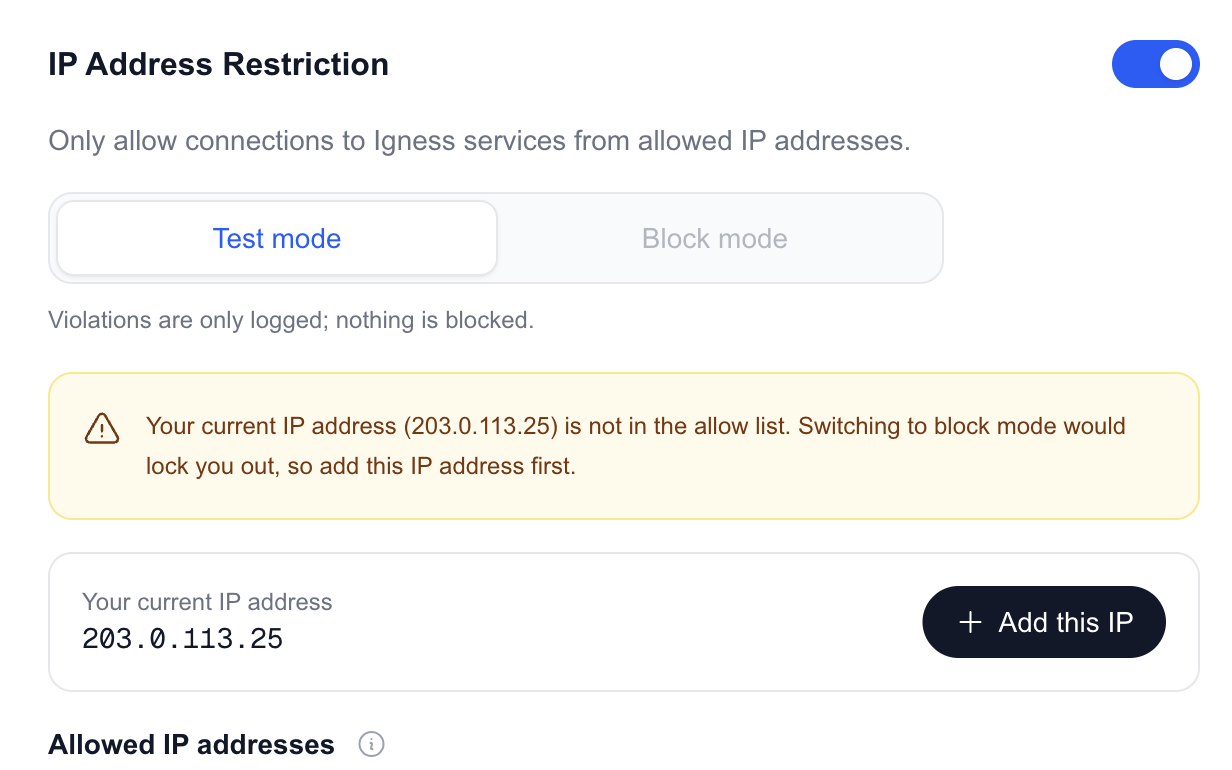
Limit access with IP restrictions
Only allowed IP addresses can reach Blaze and the admin console. Use test mode to check access before switching to blocking.
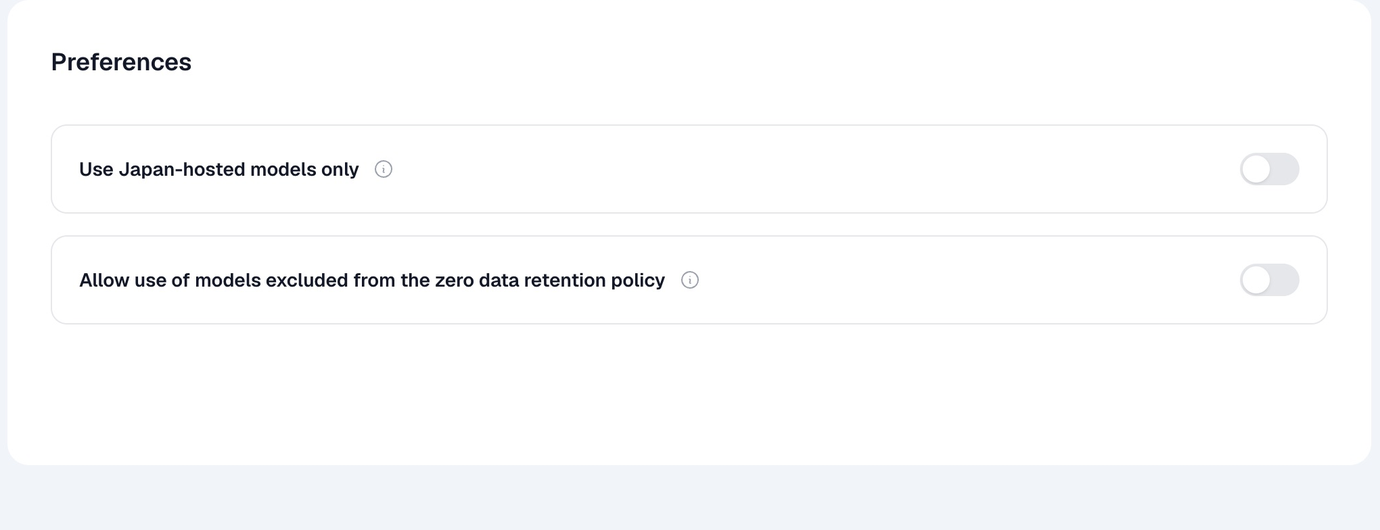
Keep AI processing within Japan
The AI processing that generates answers can also be kept within Japan.
Sign up to see the rest of this deck.
Sign up to keep reading
Only ZDR-compliant models
Blaze uses only models that support zero data retention. What you send is never used for AI training either.
Our relay doesn't store conversations
Our relay to AI models does not store conversation content. Conversation history stays only on your PC.
Other models need admin approval
Models outside ZDR can be used only when an admin allows them in environment settings. Setting changes are recorded in the audit log.
Sign up to see the rest of this deck.
Sign up to keep reading
| Stored at | Retention | Processing outside Japan | |
|---|---|---|---|
| Conversation contentInstructions, answers, files and Salesforce data read by the AI | Your PCNot stored on our servers | Managed by you on your PC | May be outside Japan depending on the modelJapan only with domestic models |
| Salesforce dataMetadata, records | Your Salesforce orgAlso on your PC while working | − | Same as conversation content for what is sent to AI |
| Login credentialsBlaze login, Salesforce authentication | Your PCStored with OS encryption | Expires | None |
| Shared outputsPublished canvases, library Skills | Our serversOnly when published or shared | Until unpublished or deleted | None |
| UsageModels used, token counts, etc. | Our servers | 365 days | None |
| Error informationError details, app version | Error monitoring service | Per the service's terms | United StatesSent only with your consent |
Sign up to see the rest of this deck.
Sign up to keep reading
| To try it outFree | For full useProfessional | |
|---|---|---|
| Monthly price | $0 | $200 / user |
| Usage | 20 conversations | Weekly usage allowanceSet a cap for extra usage |
| Salesforce org connections | Unlimited | Unlimited |
| Support | − | Email and contact form |
| Payment | − | Credit card or bank transfer |
Sign up to see the rest of this deck.
Sign up to keep reading
| Windows | Mac | |
|---|---|---|
| OS | Windows 10 or later | macOS 14.5 (Sonoma) or later |
| CPU | Intel Core i5 / i7 / i9, or Ryzen 5 / 7 / 9 | Apple M1, M2, M3, M4 or M5 |
| Memory | 8 GB or more (16 GB recommended) | 8 GB or more (16 GB recommended) |
| Disk space | 2 GB or more | 2 GB or more |
| Network | 10 Mbps or faster | 10 Mbps or faster |
Sign up to see the rest of this deck.
Sign up to keep reading
Create an account
Sign up with a Google account or email address. You start on the Free plan.
Install the app
Download and install the Windows or Mac version.
Connect Salesforce
Choose production or a sandbox and log in with your Salesforce account.
Start asking
Describe what you want, and Blaze shows a plan and gets to work.
Ask us about training sessions for rolling Blaze out in your company.
Sign up to see the rest of this deck.
Sign up to keep reading
Configuration, development and data work that the Salesforce CLI or APIs can handle. Account Engagement and Data Cloud are also supported with some setup in advance.
In Approval Mode, Blaze always stops right before deployments and record updates, and asks for confirmation with the target org name before changing production. You choose which org to change before Blaze runs, so sandbox and production work stay separate.
Your company signs one contract, and admins assign licenses to members. Admins can see who used which model, when and how much.
You open the Salesforce login page in a browser and log in with your own account. MFA works as usual. Credentials are stored encrypted on your PC and never passed to the AI.
Sign up to see the rest of this deck.
Sign up to keep reading
Professional is $200 per license per month (excluding tax). There is no limit on how many Salesforce orgs you connect.
When the usage allowance runs out, AI use stops, and no extra charges are added automatically. To keep going, an admin can set a cap for extra usage.
No. Claude and OpenAI models are included in your Blaze license's usage allowance.
The Free plan includes 20 conversations, with no credit card needed. Connect your Salesforce org and try it on real work.
Sign up to see the rest of this deck.
Sign up to keep reading
| Company | Igness, Inc. |
| Address | Wizard Bldg. 402, 1-4-3 Sengen-cho, Nishi-ku, Yokohama, Kanagawa, Japan |
| Founded | October 2024 |
| CEO | Takuma Ogura |
| Business | Consulting on digital transformation (DX) Salesforce CRM design, build, operations and adoption support Planning, development and delivery of generative AI services |
A desktop AI agent for Salesforce admins and developers

LINE Official Account broadcasts and conversations, inside Salesforce

Build AI agents for Salesforce without code
Sign up to see the rest of this deck.
Sign up to keep reading- hello@igness.ai
- Phone
- +81-50-3623-3977Mon–Fri 10–18 JST
Sign up to see the rest of this deck.
Sign up to keep reading